
ShackLAN Control Center
Macro Mode configuration
ShackLAN Control Center can operate in direct selection of antennas or in the ShackLAN macro mode. The direct selection mode is suitable for most users with a single antenna switch and maybe a 4-square or a couple of antenna stacks. Information on configuring Control Center in Direct mode is here. Macro mode provides up to eight antenna configurations (Macros) for each band. This mode is more appropriate for larger stations with multiple towers, stacks, 4-squares, etc. In Macro mode, only the antennas, stack controls, 4-square, etc for the current band are displayed. This simplifies the control presentation and prevents selection of wrong antennas. It is also perfect for guest operators.
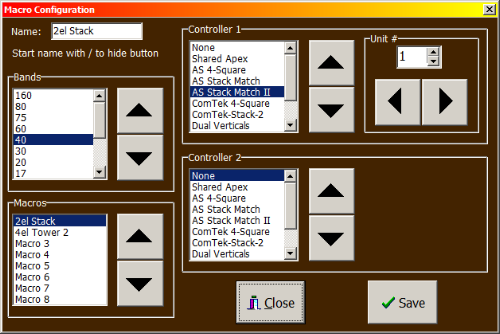
Naming the macros
Access the Macro Configuration by clicking on the Macro button in the Setup window. Start by selecting the desired band from the list followed by the macro to be defined. Now click on the Name entry field to enter a name for this macro. Start a name with / (slash) for unused macros to hide the button in the main screen. Do this for all the desired macros for each band. Click on Save when finished and proceed to assigning your controllers, if any to a macro.
Assigning controllers
Just like setting the macro names select the band for the macros you wish to configure and then select the macro from the list. You may now select the desired controllers for that macro. You must also set the Unit # for controllers that have a programmable address, such as stack and 4-square controllers. Click on Save to save your configuration. Controller 1 will appear just to the right of the Main Antenna panel in the main screen when that antenna is selected. Controller 2 will appear at the far right.
NOTE: Controller 2 is not available when operating in Dual mode.
The next step is to configure the actual antenna selections for each macro. This is done using the Switch Configuration utility.